
Benchmark
Push a controlled flood of jobs at your bunqueue server and watch, in real time, how fast it accepts and clears them.
Where: open /benchmark from the sidebar.
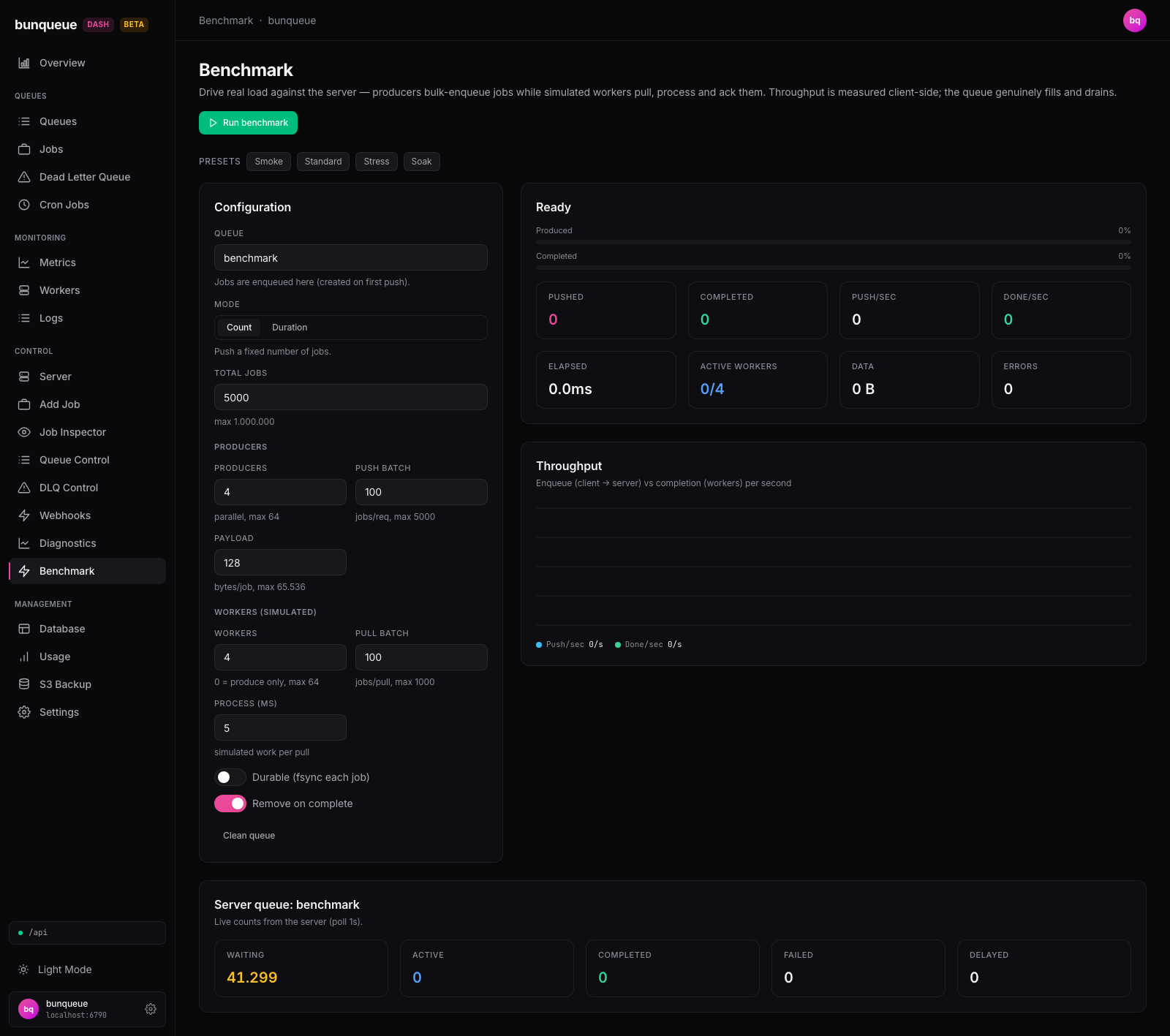
What you'll see
On the left is a Configuration card where you set up the test. On the right, a live run panel shows progress bars, stat cards, and a Throughput chart. Below, once a run finishes, you get a Summary, the server's own Server queue counts, and a Run history table of past runs.
The heading follows the run: Ready, then Producing… / Running…, Draining…, Stopping…, and finally Result (or Error). A small ETA next to it estimates the time left while the test is going.
The live stat cards update several times a second:
| Element | What it tells you |
|---|---|
| Pushed | Jobs successfully sent to the server so far. |
| Completed | Jobs pulled and finished by the simulated workers. |
| Push/sec | Current send rate, right now. |
| Done/sec | Current completion rate, right now. |
| Elapsed | Time since the run started. |
| Active workers | How many worker loops are mid-cycle at this instant. |
| Data | Total payload sent (bytes). |
| Errors | Failed sends or acks; turns red if any occur. |
The Throughput chart plots the last stretch of the run: send rate (cyan) against completion rate (green), so you can see the server keeping up, or falling behind.
The Server queue card is the ground truth. It reads the server's own counts for your target queue, Waiting, Active, Completed, Failed, Delayed, every second, independent of the client-side numbers. It's your proof the load actually landed.
What you can do
Pick a preset. Smoke, Standard, Stress, and Soak each drop a ready-made configuration into the form. Smoke is a tiny 200-job sanity check; Standard is 5,000 jobs; Stress is a heavy 50,000; Soak runs for a fixed 30 seconds instead of a fixed count. Tweak any field afterward.
Configure a run. The page assigns a cryptographically random, read-only Dedicated queue to this browser tab. Choose Mode (count for a fixed number of jobs, duration for a fixed time), then dial in producers, workers, batch sizes, payload size, and simulated processing time. Toggle Durable to fsync each job, and Remove on complete to drop finished jobs server-side.
Run a benchmark:
- Set your configuration (or pick a preset).
- Click Run benchmark. The dashboard checks the server is reachable and, when simulated workers are enabled, verifies the target queue has no runnable jobs before it starts.
- Watch the live panel; the chart and stat cards update as the load lands.
- When it finishes, review the Summary and the run is added to Run history.
Stop early. Click Stop at any time. In-flight work settles cleanly and you still get a Summary for what ran.
Clean up afterward. Use Clean queue to purge leftover benchmark jobs from the queue.
Clean queue is destructive
It permanently removes waiting, completed, failed, and delayed jobs from the target queue. You'll be asked to confirm (Remove benchmark jobs from "<queue>"?) before anything is deleted.
Keep your results. In Run history, use Copy or Export JSON to save your runs, or Clear to empty the table.
Good to know
- Throughput is measured in your browser. Push/sec and Done/sec reflect your machine, network, and browser as much as the server. When in doubt, trust the Server queue card over the live counters.
- The Summary's latency numbers cover sending only. The avg / p50 / p95 / p99 / max figures measure how long each batch took to send, not how long workers took to process.
- Run history is temporary. It keeps the last 12 runs and is lost on reload. Export JSON first if you want to compare later.
- Everything locks during a run. All configuration fields, the toggles, the presets, and Clean queue are disabled while a benchmark is active. They free up the moment it ends or you Stop.
- Worker benchmarks require an empty queue. Every generated id is tracked and only jobs belonging to the current run are acknowledged or counted. If an external producer races the run, its jobs are returned to waiting and the run stops instead of consuming that work.
- Clean queue can't remove active jobs. Jobs that were pulled but not yet acked can't be cleaned; the server re-queues them itself after its stall timeout. You'll see a note like
Cleaned, N active job(s) remain. - This is real load with real cost. Stress and Soak runs genuinely write to the server (and fsync if Durable is on). Point it at a disposable or dev server, and use Clean queue or Remove on complete so you don't leave a large backlog behind.
- If the server is unreachable, the run won't start, you'll get a clear error, and the Server queue card shows a
stalebadge while keeping the last good counts. See Known issues for verified limits.
Under the hood (for developers)
This screen uses the bq client exclusively (never api). Per worker run it calls GET /dashboard and GET /queues/:q/counts as preflight checks, then POST /queues/:q/jobs/bulk for each producer batch, POST /queues/:q/jobs/pull-batch and POST /jobs/ack-batch for the simulated workers, and POST /queues/:q/clean for Clean queue. A foreign id is returned with POST /jobs/:id/move-to-wait and stops the run.
The Server queue card polls GET /queues/:q/counts every 1 s. There is no SSE stream: a separate 200 ms client-side sampler derives the per-second rates and the rolling throughput series. Logical failures (HTTP 200 + {ok:false}) are counted as errors, with the first message surfaced in the summary.