
Webhooks
Register HTTP callbacks so bunqueue pushes job events to your own endpoint the moment they happen, no polling on your side.
Where: open /webhooks from the sidebar.
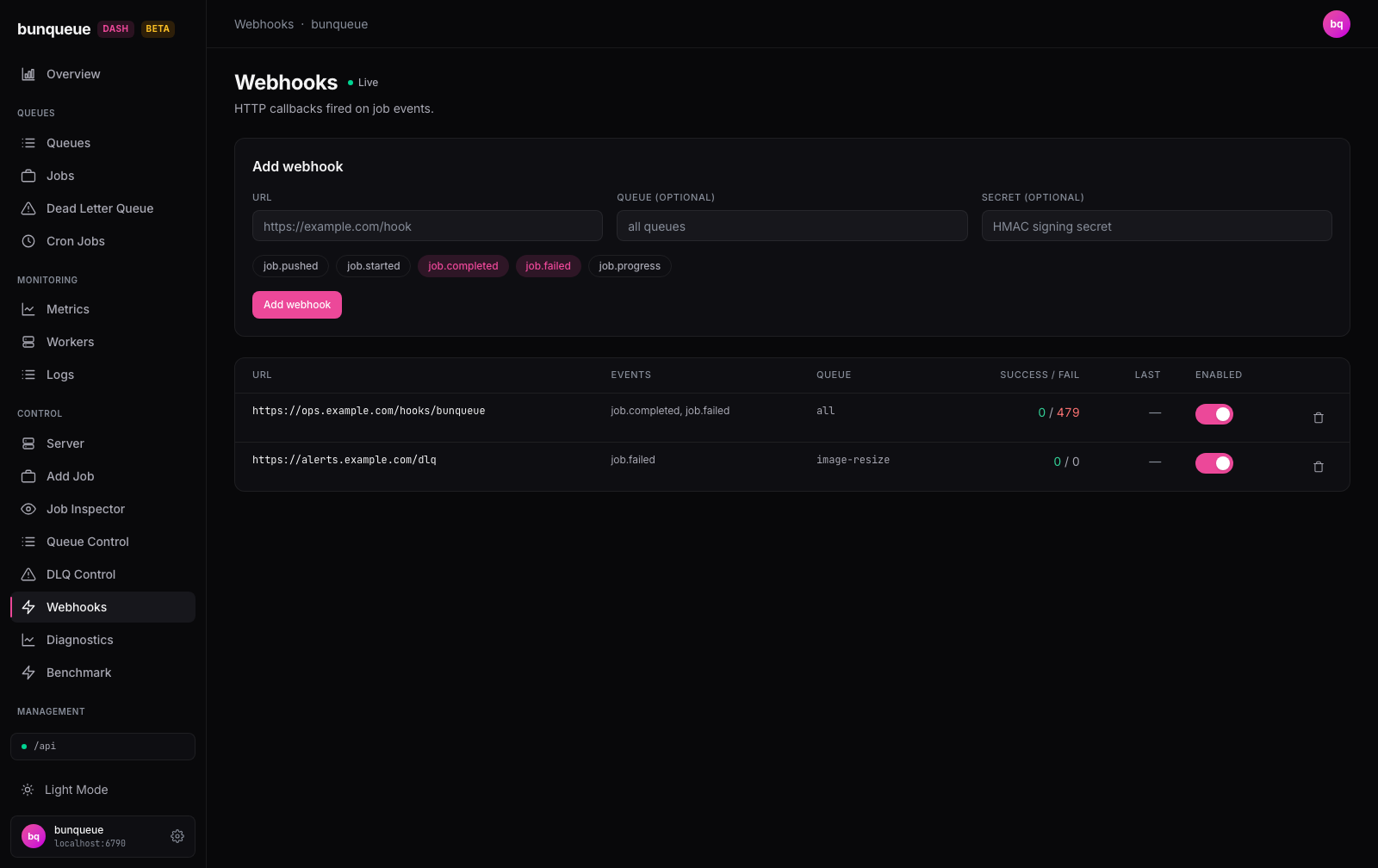
What you'll see
A header with a Live indicator (the page refreshes on its own), an Add webhook card that's always available, and a table of the callbacks you've registered. Each row is one webhook.
| Element | What it tells you |
|---|---|
| URL | Where bunqueue POSTs the event. Long URLs are trimmed to fit, hover to see the rest. |
| Events | Which job events this hook is subscribed to (for example job.completed, job.failed). |
| Queue | The queue it watches. all means it fires for every queue. |
| Success / Fail | How many deliveries have succeeded (green) or failed (red when non-zero). Running totals. |
| Last | When the hook last fired, shown as relative time (for example "20s ago"). |
| Enabled | A switch showing whether deliveries are currently active. |
Reading the counters
A climbing Fail count with Success stuck at 0 usually means the receiving endpoint is unreachable or rejecting every call. Bunqueue performs delivery retries; the dashboard displays the counters and does not provide manual redelivery. Check the receiving endpoint and the broker logs.
What you can do
Add a webhook. Fill in the Add webhook card and submit:
- Enter a URL (required).
- Optionally set a Queue, leave it blank to watch every queue.
- Optionally set a Secret, an HMAC signing secret to verify calls came from bunqueue.
- Pick one or more event pills (at least one is required).
job.completedandjob.failedare selected by default; available events arejob.pushed,job.started,job.completed,job.failed, andjob.progress. - Click Add. The button shows "Adding…" while it works, then the new hook appears in the table.
If the URL is empty or no events are picked, you'll see "URL and at least one event are required" and nothing is sent. After a successful add, the URL and Secret fields clear while your queue and event choices stay, handy for adding a similar hook.
Enable or disable a hook. Flip the Enabled switch on any row. Deliveries stop or resume immediately; the registration and its counters are kept either way.
Remove a hook. Click the trash icon on its row.
Removing is permanent
Deleting a webhook asks you to confirm ("Remove webhook for <url>?"), then removes it along with its counters. There's no undo, you'd have to add it again.
Good to know
- There's no edit. To change a hook's URL, events, queue, or secret, delete it and add a new one.
- The secret is write-only. You can set a signing secret, but the page never shows it back to you.
- Delivery retries belong to Bunqueue. Version 2.9.4 defaults to 3 retries with a 1,000 ms base delay (
WEBHOOK_MAX_RETRIES,WEBHOOK_RETRY_DELAY_MS); the delay grows between attempts. The dashboard has no manual resend action. - Endpoint safety: Bunqueue rejects loopback and private network callback URLs. Local browser tests exercise registration, enable/disable and deletion with an unused queue and a reserved
.invalidURL; they do not prove outbound delivery or signature verification. - Empty and offline states are clear. With no hooks yet, you'll see "No webhooks" and a prompt to add one. If the connection drops, the last table stays on screen with a Retry button, and a failed enable/disable/delete shows a red banner instead of silently snapping back.
- The list pages at 15 rows. Large lists are split into pages of 15 in your browser, fine for typical use. See Known issues for notes on client-side pagination.
Under the hood (for developers)
This screen uses the bunqueue HTTP API on :6790 (the bq client), not the control agent:
- List:
GET /webhooks, the payload is wrapped in{ ok, data: { webhooks, stats } };statsis returned but unused. - Create:
POST /webhookswith{ url, events, queue?, secret? }. - Enable/disable:
PUT /webhooks/:id/enabledwith{ enabled }. - Delete:
DELETE /webhooks/:id.
The list is polled on the global refresh interval (default 3000 ms, configurable in Settings), pauses while the tab is hidden, and refetches after every change. There is no SSE stream on this page.