
Workers
A live registry of every worker connected to your server, so you can confirm your consumers are alive, see how much work each is doing, and clean up a stale registry record after stopping its process.
Where: open /workers from the sidebar.
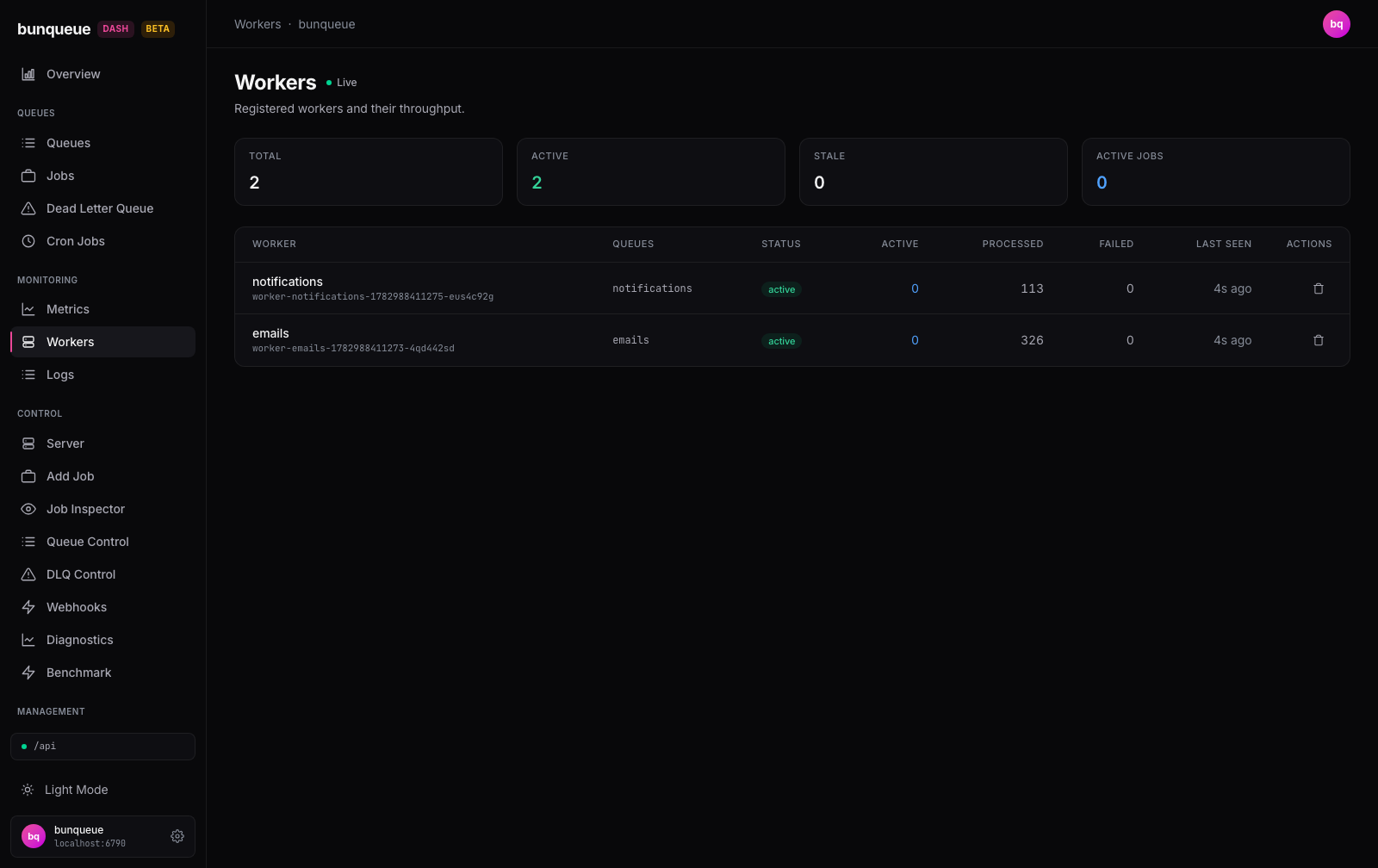
What you'll see
A Live indicator next to the title tells you the page is getting fresh data; it drops off if the server stops answering. Five cards summarize the whole fleet, and a table lists each worker underneath.
The summary cards:
| Element | What it tells you |
|---|---|
| Total | How many workers are registered right now |
| Active | Workers that are heartbeating (healthy) |
| Stale | Workers that stopped heartbeating (turns amber when any exist) |
| Active Jobs | Jobs being processed across the whole fleet |
| Quarantined | Malformed registrations isolated from the actionable table |
Each row in the table is one worker:
| Column | What it tells you |
|---|---|
| Worker | The worker's name, with its full id below it |
| Queues | The queues this worker consumes (— if none) |
| Status | A pill: green active or amber stale |
| Active | Jobs this worker is processing right now |
| Processed | Jobs it has completed over its lifetime |
| Failed | Jobs it has failed over its lifetime |
| Last Seen | How long ago its last heartbeat arrived (e.g. "4s ago") |
| Actions | Registry cleanup for a stale worker reporting zero active jobs |
What you can do
- Remove a stale registry record, click the trash icon on a stale row that reports zero active jobs. You'll be asked to confirm; on success a green message appears above the table, and the list refreshes.
- Retry, if the server is unreachable, an offline banner appears with a Retry button to fetch again.
Workers aren't created or edited here; they're started by your own consumer processes and register themselves. This screen is for monitoring them and cleaning up records only after the corresponding process has stopped.
WARNING
Registry cleanup does not stop the worker process. In Bunqueue v2.9.3, a running worker does not automatically re-register after its heartbeat record is removed. Stop and verify the process first; use this action only for stale, idle records.
Good to know
- Quarantined records are not actionable. Invalid identity, counters or status values produce a separate diagnostic list; they cannot be removed through the worker table.
- Stale doesn't mean stopped. A worker that stops heartbeating turns amber and counts toward Stale, but its process may still exist. Verify it outside the dashboard before removing the record.
- The summary cards always reflect the full fleet. Even when the table is capped, Total, Active, Stale, and Active Jobs are counted across every worker.
- The table shows at most 100 workers, with no pagination. Past that, a note reads "Showing first 100 of N workers." See Known issues.
- First load shows a brief "Loading workers…"; after that, updates happen quietly in place with no flicker. If no workers are connected, you'll see an empty state instead.
- Don't confuse this with the classic Workers page (
/workers-classic), which is read-only, shows fewer rows, and has no status pill or registry-cleanup button.
Under the hood (for developers)
- Reads
GET /workersvia thebqclient (payload wrapped indata); guarded registry cleanup callsDELETE /workers/:id. - Polls on the global refresh interval (default 3000 ms, adjustable in Settings, floored at 500 ms), pauses while the tab is hidden, and skips re-renders when the worker list is unchanged.
- The response carries more fields than are shown (e.g.
concurrency,hostname,pid,registeredAt,uptime); the table renders a subset.