
Queue Control
Your operations console for a single queue: pause, promote, set explicit policies, and tune it with flow-unsafe deletion paths disabled.
Where: open /queue-control from the sidebar.
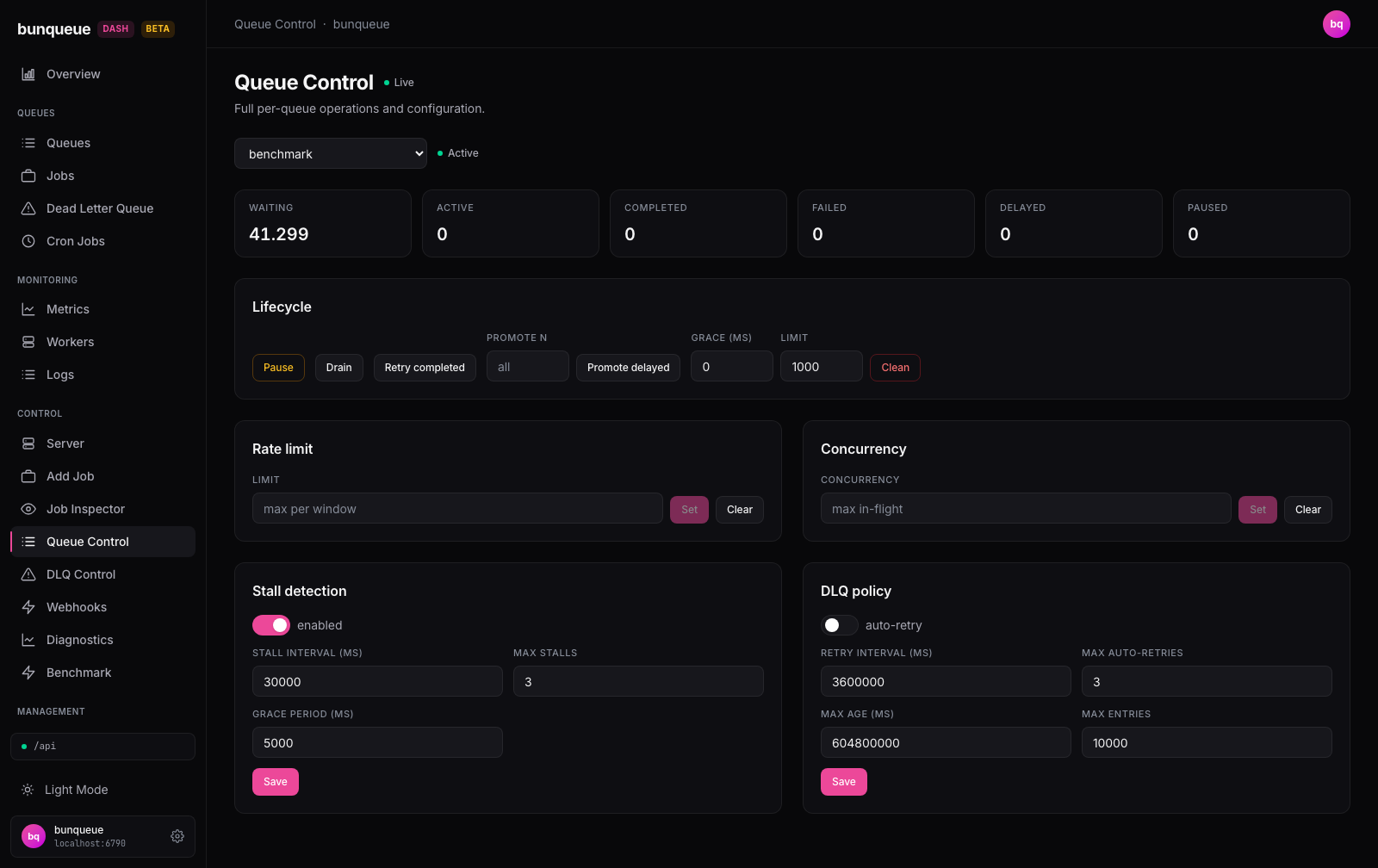
What you'll see
Start with the queue picker at the top and choose a queue by name. Next to it, a colored status dot shows whether that queue is running, and an inline message reports the result of your most recent action. The first queue is selected for you on load.
Once a queue is selected, a row of eight count cards summarizes every v2.9.3 job state (numbers shown with thousands separators), followed by cards for every control you can operate.
| Element | What it tells you |
|---|---|
| Status dot | Green Active when running, amber Paused when the queue is paused. |
| Last-action message | Green on success (with an affected count when available), red with the error text on failure. |
| Waiting | Jobs queued and ready to run. |
| Prioritized | Ready jobs held in the priority-ordered queue. |
| Active | Jobs being processed right now. |
| Completed | Jobs that finished successfully. |
| Failed | Jobs that ran out of retries (dead-lettered). |
| Delayed | Jobs scheduled to run later. |
| Waiting-children | Flow parents blocked on structural or dependency children. |
| Paused | Jobs held because the queue is paused. |
Below the counts you get the Lifecycle card (pause, promote, and visibly unavailable requeue/deletion controls), the Rate-limit desired state and Concurrency desired state cards, a live Queue SDK operations console, and the Stall detection and DLQ policy forms.
What you can do
Pause / Resume, one button toggles the queue between running and paused; its label and color follow the current state.
Requeue completed is visible but disabled. Bunqueue v2.9.3's retryCompleted path resets the job without reconstructing dependency registration or the ordering guarantees of its original flow.
Promote delayed, moves delayed jobs to waiting so they run now. Leave the Promote box empty to promote all of them, or enter a number to promote just the first N.
Replace rate-limit policy, enter a positive integer limit and an explicit positive Window (ms), then choose a permanent policy or Expires after with a TTL. The HTTP mutation remains an explicit desired-state replacement; the separate SDK readback below shows the authoritative current policy.
Replace concurrency policy, enter a positive integer maximum in-flight count. Clearing either policy is labelled Ensure no …, requires typing the exact queue name, and refreshes the independent SDK readback after the server acknowledges the mutation.
Inspect Queue SDK state, refresh the official global rate-limit, concurrency, remaining rate-limit TTL, and saturation contracts. The same console reads a group's counts, pause state, bounded pending-job page and per-priority counts; pauses/resumes that group and sets/clears its rate and concurrency policies. It also resolves or explicitly releases a deduplication key, reads paged completed/failed one-minute metric buckets, and trims the bounded lifecycle event journal after confirmation. Changing queue clears every snapshot and receipt immediately. Changing connection profile also invalidates in-flight reads and post-mutation refreshes, so a result from one broker is never relabelled or continued against another.
To adjust stall detection:
- Open the Stall detection form.
- Toggle enabled, then fill in Stall interval (ms), Max stalls, and Grace period (ms), all three are required.
- Click Save. You'll see
Saved ✓when it lands.
To adjust the dead-letter policy:
- Open the DLQ policy form.
- If upstream auto-retry is already enabled, turn it off. The dashboard never permits enabling it because v2.9.3 cannot verify hidden reverse flow dependencies. Retry interval and max-auto-retries remain editable.
- Read Max age and Max entries as server state only. They are disabled: lowering
maxEntriescan immediately evacuate entries, andmaxAgedrives destructive expiry without an atomic generation/topology check. - Click Save. The request deliberately omits
maxAgeandmaxEntries.
Flow-destructive operations fail closed
Drain and Clean are visible but disabled. v2.9.3 has no reverse-dependency lookup or atomic topology mutation, so no queue scan or confirmation can prove that deleting those jobs will not strand a cross-queue parent. Obliterate, job Cancel and DLQ Purge follow the same policy. Every DLQ retry also fails closed because its POST has no atomic generation/state/topology precondition; completed-job requeue cannot restore flow dependency registration/order.
Good to know
- Switching queues discards unsaved edits. If you type into the Stall or DLQ form and change queues before saving, your changes are lost.
- A live update can overwrite your edits. If the same queue's config changes elsewhere while you're editing, the form may refresh to the new values. Typing is otherwise preserved across background refreshes.
- Numeric policy fields are validated before sending. Stall fields and the editable DLQ retry interval/count require non-negative safe integers. Rate-limit and concurrency require positive safe integers; the rate window is mandatory and TTL is an explicit permanent/expiry choice. DLQ retention values are never parsed into a save because they are read-only.
- Some controls appear only when the server supports them. If a queue has no stall or DLQ configuration, that form is hidden for it.
- When the queue can't be reached, a banner with a Retry button appears above the content. While an action is running, the buttons are briefly disabled.
- The last-action message is a single shared line, each new action replaces the previous result.
Under the hood (for developers)
This screen uses bq for HTTP controls and a repository adapter for the pinned agent Queue SDK bridge. The queue picker polls GET /dashboard/queues every 30 s. The selected queue refreshes on the global live cadence (default 3 s, configurable in Settings, floor 500 ms), fetching counts + paused state (GET /dashboard/queues/<queue>?includeJobs=false) alongside GET /queues/<queue>/stall-config and .../dlq-config.
Enabled actions map to: POST .../pause · .../resume · .../promote-jobs; PUT/DELETE .../rate-limit (body { limit, duration, ttl? }) and .../concurrency (body { concurrency }); and PUT .../stall-config · .../dlq-config. The DLQ save projects only autoRetry, autoRetryInterval and maxAutoRetries; it never sends maxAge or maxEntries, and only autoRetry:false is permitted. The upstream retry-completed/drain/clean routes exist but are intentionally never called here. The client throws on any HTTP-200 response with { ok: false }, so logical failures surface as the red inline error.
SDK reads and mutations use /agent/queue-operations/:queue/*, are pinned to the process manager's running port, validate exact bounded input, serialize access, and close their dedicated Bunqueue Queue connection after each operation.