
Jobs Explorer
Browse, inspect and export the jobs in a queue. Delayed jobs can be promoted, while DLQ retry and completed-job requeue fail closed.
Where: open /jobs from the sidebar.
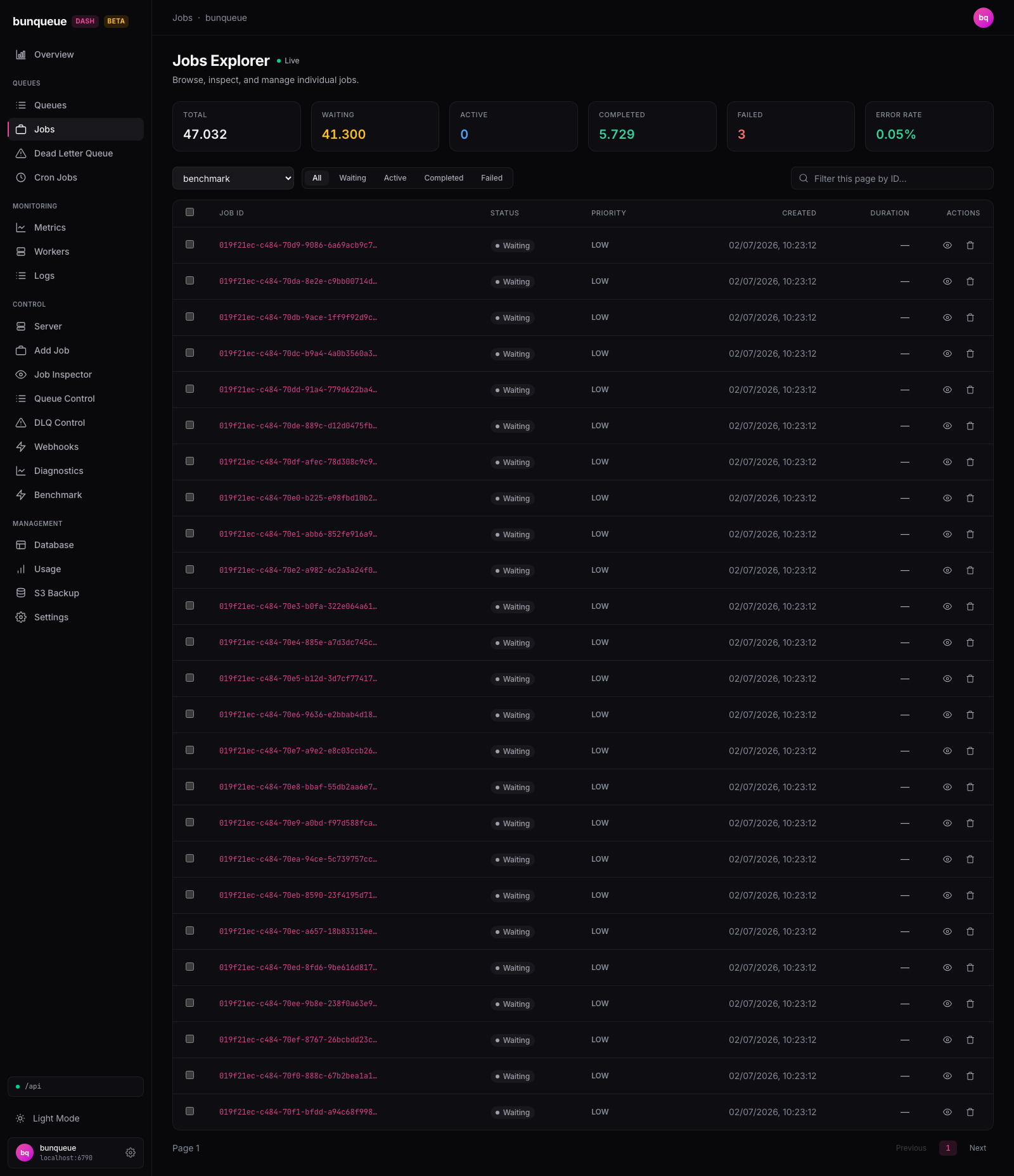
What you'll see
A live indicator in the header tells you the page is refreshing on its own. At the top, six stat cards summarize the whole server. Below them are the filters, then the job table.
| Element | What it tells you |
|---|---|
| Total | Every job across all states, server-wide. |
| Waiting | Jobs enqueued but not started yet. |
| Active | Jobs being processed right now. |
| Completed | How many jobs have finished successfully (lifetime). |
| Failed | How many jobs have failed (lifetime). Turns red when it's above zero. |
| Error Rate | Failures as a share of finished jobs. Green when healthy, red above 5%. |
Each row in the table shows one job:
| Column | What it tells you |
|---|---|
| Job ID | The job's identifier. Hover to see the full ID if it's cut off. |
| Status | The job's current state as a colored badge. |
| Priority | HIGH, MEDIUM, or LOW, based on the job's priority value. |
| Created | When the job was added. |
| Duration | How long the job took to run. Shows , until the job has both started and finished. |
| Actions | Inspect, plus any actions the job's state allows. |
INFO
The stat cards describe the entire server, so they won't match the counts of the queue you have selected below.
What you can do
Pick a queue. Use the queue dropdown to choose whose jobs to list. If you arrived from a link with a queue already set, it's pre-selected; otherwise the first queue is chosen for you.
Filter by status. Switch between all, waiting, active, completed, and failed.
Search this page by ID. Type in the ID filter to narrow the rows down to a matching ID. This searches only the rows currently on screen (see Good to know).
Inspect a job. Click the eye button on any row to open it in the Job Inspector.
Act on a single job. A delayed row also offers:
- Promote, move a delayed job to run now.
Act on many jobs at once. Tick the checkboxes (or the header checkbox to select the whole page) to reveal a bulk toolbar. Promote selected appears only when at least one visible selected job is delayed; no Retry or Requeue bulk action is exposed.
Export CSV, download the rows on the current page.
Unsafe lifecycle transitions fail closed
The dashboard never exposes DELETE /jobs/:id. Bunqueue v2.9.3 cannot reveal every reverse flow dependency, so deleting an apparently standalone job can permanently strand another queue's parent. DLQ retry is also unavailable because its GET + POST sequence has no atomic generation/state/topology precondition and can hit a recreated job. Completed-job requeue is unavailable because retryCompleted does not rebuild dependency registration or flow order.
After any action, the row (or selection) reports success or failure in a short status line above the table, and the list refreshes. Buttons on a busy row are disabled until it finishes.
Good to know
- The ID filter only searches the current page. It matches the 25 rows on screen, not the whole queue. To find one specific job in a large queue, use the Job Inspector's direct lookup instead.
- There's no "page X of Y." You page through 25 jobs at a time. Next stays available as long as a full page arrives; a shorter page means you've reached the end.
- Which actions appear depends on the job's state. A delayed job can be promoted. Active, completed and failed jobs have no state-changing row action; if none of the selected jobs is delayed, the toolbar says so.
- Changing queue, status, or page clears your selection. This is on purpose, so a bulk action can never hit rows you picked under a different view.
- If the server is unreachable, a banner with a Retry button appears and your already-loaded rows stay visible.
- This
/jobspage is the corrected, server-paginated explorer. A separate legacy jobs page exists but isn't what this screen uses, see Known issues.
Under the hood (for developers)
Everything here uses the shape-verified bq client (not the legacy api client).
- Queue dropdown:
GET /queues/summary, polled every 30 s. - Stat cards:
GET /dashboard, polled every 10 s. - Job table:
GET /queues/:q/jobs/list?states=…&limit=25&offset=…, polled at the global refresh interval (default 3 s, configurable in Settings). The response is flat{ ok, jobs }with nototal, so "next page" is inferred from a full 25-row page. - The only job-lifecycle mutation maps to
POST /jobs/:id/promote. This page never calls DLQ retry or retry-completed endpoints.