
Database
Browse and inspect your bunqueue server's underlying SQLite database, read-only, with no risk of changing anything.
Where: open /database from the sidebar.
What you'll see
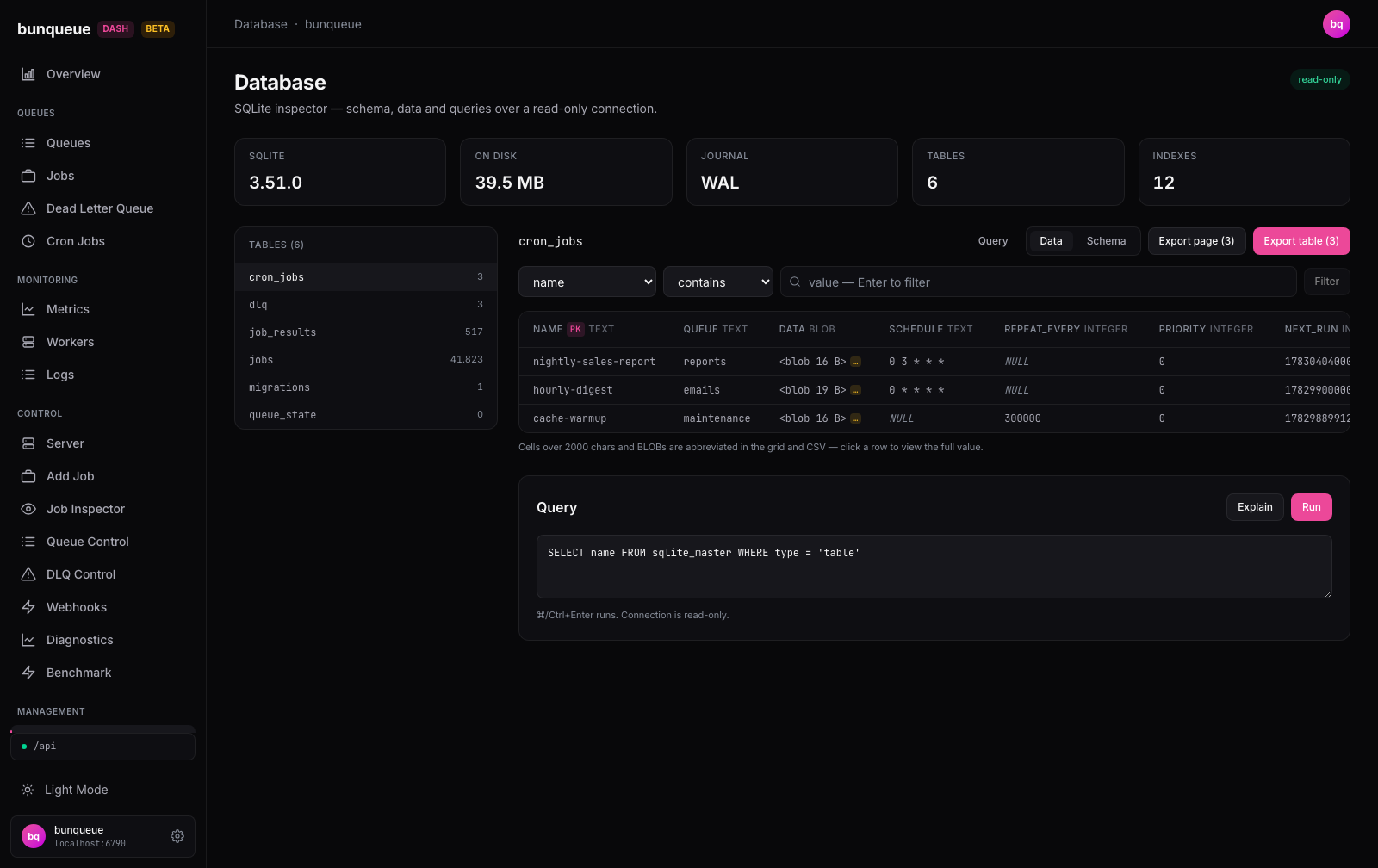
The page opens on a set of stat cards summarising the database, a list of tables on the left, and a data grid on the right. A read-only badge in the header is literal: nothing on this screen can change your data.
The stat cards across the top tell you:
| Element | What it tells you |
|---|---|
| SQLite | The database engine version. |
| On disk | Total size on disk, including the write-ahead log. |
| Journal | The journal mode (usually WAL). |
| Tables | How many tables the database has. |
| Indexes | How many indexes exist across those tables. |
The Tables list on the left shows every table with its live row count; the one you're viewing is highlighted. Pick a table and the right side fills in.
For the selected table you get two tabs:
- Data, a sortable, paginated grid (50 rows per page). Primary-key columns carry a PK badge and each column shows its type.
NULLvalues are shown faint and italic. A small amber…chip marks a value that was shortened to fit, click the row to read it in full. - Schema, the table's columns and their constraints, its indexes, and the original
CREATE TABLEstatement (with a copy button).
At the bottom, a Query panel lets you run your own read-only SQL and see the results in the same kind of grid.
What you can do
- Pick a table from the left list to load its rows.
- Switch between Data and Schema with the tabs above the grid.
- Sort a column by clicking its header, it cycles ascending, descending, then off.
- Filter rows using the filter bar: choose a column, an operator (
contains,=,≠), type a value, and press Enter or Filter. Use Clear to remove it. (The Filter button stays disabled until you type a value.) - Open a row with its View button. A drawer slides in with every column's full, untruncated value and a copy button on each. Close it with the X, the backdrop, or
Escape. - Export the current page as a CSV file, or Export table to download one bounded, point-in-time CSV of the filtered and sorted table view.
Running your own query:
- Type SQL into the Query box, or click Query on a table to pre-fill a
SELECTfor it. - Press Run (or
⌘/Ctrl+Enter) to see the results, or Explain to see the query plan. - Reuse a recent query from the History chips, and download results with CSV or JSON.
Nothing here is destructive
Every action is a read or a download, so nothing asks for confirmation. Even hand-typed SQL can only read: writes are rejected before they reach the database.
Good to know
- It's a viewer, not a console. Only read queries run, anything that would change data is refused. Your SQL must start with
SELECT,WITH,EXPLAIN,VALUES, orPRAGMA. - Query results are capped at 500 rows. Larger results show a
≥ 500 rowsnote and only the first 500; narrow the query, or use Export table for a larger bounded snapshot. - A full-table export is one agent-side SQLite snapshot. The current table, sort, and filter are captured when you click; the agent reads them in one read-only transaction, so concurrent WAL writes cannot mix database snapshots into the file. The CSV is not rebuilt from browser pages.
- Table CSVs stop at the first active cap: 200,000 data rows or a 16 MiB response body (including the header and row separators). A byte-limited export keeps only complete CSV records. The completion message says whether the row or byte cap truncated the result.
- Grid and export truncation differ from the row drawer. Grid cells are shortened at 2,000 characters and BLOBs are represented by their byte size; Export current page writes those displayed values. For the agent's full-table CSV, a TEXT value over 2,000 UTF-8 bytes is represented by its first 2,000 SQLite characters plus
…, and a BLOB becomes<blob N B>. Open the row drawer for the separate full-cell read (itself bounded at 1,000,000 characters). - CSV text is spreadsheet-safe. Text beginning with
=,+,-,@, tab, or carriage return is prefixed with an apostrophe before RFC 4180 quoting, preventing Excel or Sheets from treating stored database text as a formula. Numeric SQLite values remain numeric. - No database yet? Before you start the server for the first time, there's no database file. You'll see a No database yet message, start bunqueue once from Control ▸ Server to create it.
- Query history is per-browser. Your last 10 successful queries are saved locally in this browser only; they aren't shared across devices.
- Counts can lag a few seconds. The stats, table list, and rows refresh on their own timers, so on a busy server they may trail live writes slightly.
- Database and Workflow reads have a 5-second deadline; CSV exports have 15 seconds. Each read runs in a disposable process in both source and compiled builds. A timeout or disconnected request kills that process and waits for it to exit. Two reads and one export can run concurrently. Up to 32 ordinary page reads may wait in a fair queue within the same five-second deadline; custom SQL refuses overload immediately. Full queues receive HTTP 429. Process-control endpoints remain available during slow scans.
Under the hood (for developers)
This screen talks to the local control agent (:6800, /db/* endpoints) via the bq client, never the bunqueue HTTP API. The agent uses a read-only SQLite connection plus a statement allowlist, so writes are impossible.
GET /db/info, store metadata (polls ~15 s)GET /db/tables, table list + row counts (polls ~10 s)GET /db/tables/<t>/schema, columns, indexes, DDL (polls ~30 s)GET /db/tables/<t>, a row page (polls ~6 s)GET /db/tables/<t>/export, one filtered/sorted CSV from a single read transaction (on Export table)GET /db/tables/<t>/cell, full value for a truncated cell (on drawer open)POST /db/query, a custom read-only query (on Run)
The export response is raw text/csv; charset=utf-8, not JSON. Content-Length and X-Bunqueue-Db-Export-{Version,Table,Rows,Bytes,Cap} let the client validate the table identity, exact byte count, and whether rows or bytes stopped the export before starting the download; the response is no-store and nosniff.
Server-side limits: 500-row cap per query, 2,000-character grid-cell truncation, the full-table TEXT rule described above, 1,000,000-character full-cell cap, 200,000-row / 16 MiB full-table export caps, a 32 MiB child-response ceiling, and process deadlines of 5 seconds for reads and 15 seconds for exports. The child supervisor also exits if the agent disappears, including an abrupt kill.