
Dead Letter Queue
This screen is where jobs land after they fail and run out of retries. You can inspect, filter and export failures; every manual, bulk and queue-wide retry control is unavailable under the v2.9.3 fail-closed policy.
Where: open /dlq from the sidebar.
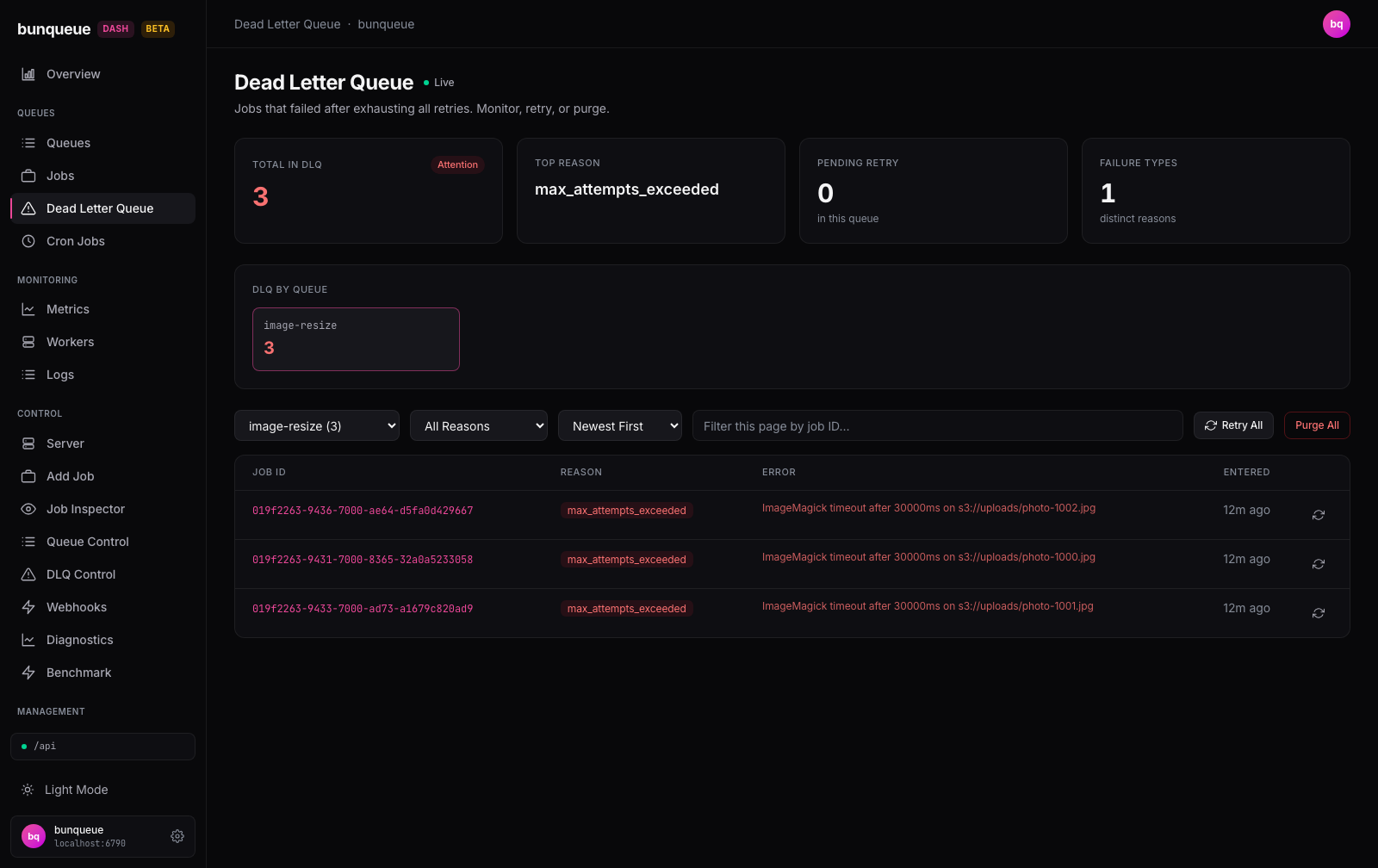
What you'll see
At the top are four summary cards. Below them, a grid of tiles, one per queue that currently has failures, lets you drill into a single queue. Pick a queue and its failed jobs appear in the table underneath, with a toolbar to filter and sort them.
Only Total in DLQ counts every queue at once. The other three cards describe the queue you've selected, and show a placeholder (Select a queue or , ) until you pick one.
| Card | What it tells you |
|---|---|
| Total in DLQ | Failed jobs across every queue. The badge reads Healthy (green) at zero, Attention (red) when there's anything to look at. |
| Top Reason | The most common failure reason in the selected queue. |
| Pending Retry | Jobs in the selected queue waiting to be retried automatically, but not yet retried. |
| Failure Types | How many different failure reasons the selected queue has. |
Once you pick a queue, its failed jobs list in a table:
| Column | What it tells you |
|---|---|
| Job ID | The failed job's ID. Click it to open the job in the inspector. |
| Reason | Why it failed, shown as a red badge (for example max_attempts_exceeded). |
| Error | The error message, shortened to fit. A dash means no message was recorded. |
| Entered | How long ago the job landed in the dead letter queue. |
| (last column) | A disabled retry button; destructive removal is not exposed. |
TIP
Jobs can have first-class names in Bunqueue 2.9, but names are not unique and this table uses the Job ID as the stable failure identifier. Click it to see the name, full timeline, and error detail.
What you can do
- Pick a queue, choose it from the dropdown or click a tile. Its failures load, and the reason filter resets to show everything.
- Filter by reason, narrow the list to a single failure reason.
- Sort by newest or oldest, order the list by when jobs entered the queue.
- Search by Job ID, type part of an ID to find a specific failure fast.
- Open a job, click any Job ID to inspect its full history.
- Page through, the pager moves 25 entries at a time.
- Export this page, download the currently loaded entries as CSV. Retry one job is visible but disabled. A preliminary exact-ID GET cannot authorize the separate retry POST: the endpoint has no atomic precondition for job generation, state or topology, so the original job can disappear and a different job recreated under the same ID can receive the POST.
Retry all is visible but disabled for the same reason, with the additional problem that the targeted DLQ can move while the request is in flight.
Purge all is visible but disabled because deletion can strand hidden cross-queue dependents.
Atomic safety takes precedence
Bunqueue v2.9.3 exposes no generation/state/topology-conditional DLQ retry and no reverse-dependency-aware purge. A warning, confirmation, pinned target or fresh queue/job scan cannot make either mutation atomic, so the dashboard calls none of those routes.
Good to know
- The reason filter, ID search, and sort work on the page you're viewing, not the whole queue. When a queue has more than one page of failures, these tools only touch the 25 entries currently on screen, the sort labels say "(this page)", and if a filter finds nothing it'll remind you to check other pages with the pager. This is a known limitation of the server, not a bug. See Known issues.
- The by-queue tiles hide empty queues. Only queues that actually have failures show up, so the grid stays focused on what needs attention. If nothing has failed anywhere, the grid disappears entirely.
- The three per-queue cards can go blank. If the queue's stats fail to load, Top Reason, Pending Retry, and Failure Types fall back to placeholders, but the table still works. Total in DLQ is always independent.
- Total in DLQ can lag by a few seconds. It refreshes on a slower cycle than the rest of the page, so after an external mutation or server-side retention event the grand total may take a moment to catch up.
- Every Retry / Retry All / Purge All control remains disabled by design, even after selecting a queue.
- Individual permanent removal is unavailable. Bunqueue 2.9's
Queue.removeDlqJob()still accepts only queue + job ID, which cannot prove a custom ID was not reused for a different generation after the row was read. - Existing server retention can remove entries without a dashboard action.
maxEntriesmay evacuate entries immediately andmaxAgedrives destructive expiry. Queue Control shows both values read-only and cannot save them.
Under the hood (for developers)
- Uses the shape-verified
bqclient throughout. - Two polls run in parallel. The queue list (for the grand total, tiles, and dropdown counts) refreshes every 10s via
GET /dashboard/queues. The selected queue's entries (GET /queues/:q/dlq) and stats (GET /queues/:q/dlq/stats) refresh on the global interval (default 3s, set in Settings); a stats failure is swallowed so the table still renders. - Row, queue-wide and global retry/removal controls are disabled. No DLQ mutation request is sent from this page.